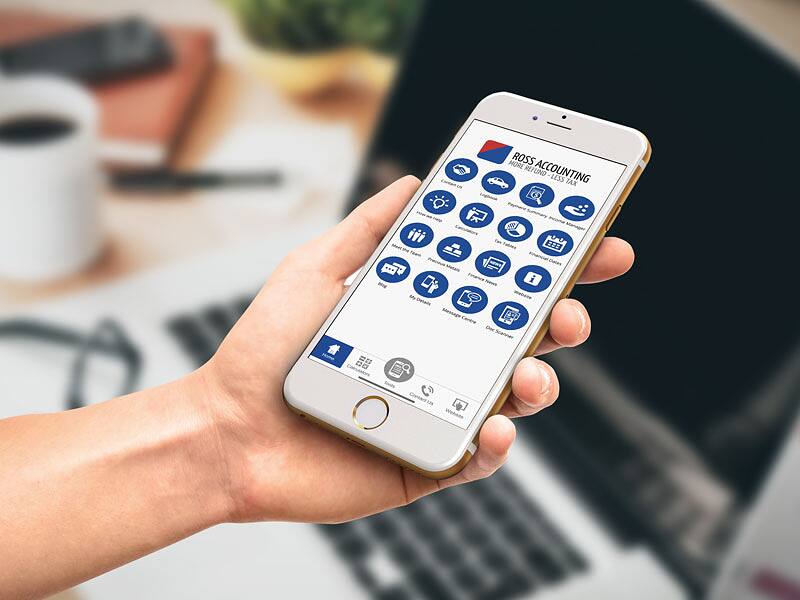
How to set up the app
Setting up takes a few steps and there is nothing to pay to download it. The app is published by MyFirmsApp, so check the developer name in the store before installing.
- Open the App Store on an iPhone or iPad, or the Google Play Store on an Android phone or tablet.
- Search for MyAccountants and download it.
- Open the app once it has installed.
- Enter your email address and the accountant code Ross.
Direct links: MyAccountants on the App Store and MyAccountants on Google Play. The App Store listing says the iPhone and iPad versions need iOS or iPadOS 11.0 or later.
If the app will not accept the code, or it is unclear which email address to use, contact us for help.
What the app does
According to its App Store and Google Play listings (checked October 2026), MyAccountants has five main tools:
- Receipt manager: take a photo of a receipt, sort it into a category and export your receipts as a spreadsheet to send to your accountant.
- Income manager: record invoices and payments you receive, with notes and an image, and export them for your accountant to include in your accounts.
- Mileage and logbook tracker: tap start and stop to record a trip using GPS, which keeps running while the app is minimised. Trips you forget to record can be added by hand later, and the mileage can be exported.
- Calculators: loan and mortgage repayments, savings, APR and currency conversion.
- Tax and finance information: tax tables, key tax dates and financial and budget news.
The listings describe the app as a way to keep records on hand between appointments, not a replacement for your accountant. Your tax return, BAS or financial statements are still prepared and checked by the team.
Do photos of receipts count as tax records?
Yes, in most cases. The ATO says records can be kept on paper or electronically, including as photos, as long as each copy is a true and clear copy of the original, and that any electronic device or app can be used. It also recommends backing up electronic records regularly.
For a work-related expense, the ATO generally expects written evidence from the supplier, such as a receipt or invoice, that shows what was bought, the cost, the supplier's name, the date of the purchase and the date the document was prepared, although a few limited exceptions apply. The ATO does not treat a bank or card statement on its own as written evidence, because it does not come from the supplier and usually lacks those details. Before relying on a photo, it is worth checking that all of these details are readable.
Under the ATO's general rule (current guidance as at October 2026), individuals keep written evidence for 5 years from the date they lodge their tax return, with longer periods for depreciating assets, capital gains tax assets and disputes. Businesses also need to keep most records for 5 years, and the ATO notes that ASIC requires companies to keep records for 7 years.
Our guides on record keeping for individuals and business record keeping explain the rules in more detail.
Exporting your receipts and income from the app from time to time gives you a copy kept outside your phone, which fits the ATO's advice to back up electronic records.
Using the mileage tracker for car expense claims
Trips recorded in the app can help support a car expense claim, but the ATO sets specific requirements, and they depend on the method used.
For the logbook method, the ATO says the logbook must cover at least 12 continuous weeks that broadly represent your travel. For every work trip it needs the purpose, the destination, the odometer readings at the start and end, and the kilometres travelled, plus odometer readings for the start and end of the whole logbook period. Each trip is to be recorded at the end of the journey or as soon as possible afterwards. The ATO also accepts an electronic logbook kept with the myDeductions tool in the ATO app.
A logbook is valid for 5 years, unless circumstances change so that it no longer reflects work travel, for example a new job or a house move, in which case a new 12 week logbook is needed. Receipts or other records of the car's running costs are also required.
The app store listings do not say whether the MyAccountants mileage export contains every item the ATO requires, so it is sensible to check that each trip has a purpose and odometer readings recorded, or keep those details alongside it. Our guide to car expense deductions compares the logbook and cents per kilometre methods.
Who the app suits
- Employees who claim work-related expenses and want receipts in one place at tax time. See work-related deductions.
- Sole traders and contractors who want to log income and expenses as they go. See sole trader tax returns.
- Anyone who drives for work and needs trip records for a car expense claim.
- Business clients who want to send receipts and income records to their bookkeeping team without paper.
Businesses that already use accounting software such as Xero or MYOB will usually keep using it for their books. Our Xero and MYOB page explains how we work with those systems.
Other ways to keep records
Using the app is optional. The ATO also offers a free record-keeping tool called myDeductions inside the ATO app, which can store photos of receipts and car trips, and lets you email your records to a registered tax agent. Paper records and spreadsheets are also accepted, provided they contain the required details.
Whichever option you use, bringing your records to your appointment, together with the items on our tax return checklist, helps us prepare your tax return accurately. New to Ross Accounting? See how to become a client.
Frequently asked questions
What is the accountant code for Ross Accounting in the MyAccountants app?
The accountant code for Ross Accounting in the MyAccountants app is Ross. After downloading MyAccountants from the App Store or Google Play, open it and enter your email address and the code Ross.
Does the MyAccountants app cost anything?
The MyAccountants app is free to download from the App Store and Google Play, according to its store listings as checked in October 2026.
Does the ATO accept photos of receipts taken with the MyAccountants app?
The ATO accepts electronic records, including photos taken with any device or app such as MyAccountants, as long as each photo is a true and clear copy of the original receipt. Under the ATO's general rule (current guidance as at October 2026), individuals keep these records for 5 years from the date they lodge their tax return, and the ATO recommends backing up electronic records regularly.
Can the MyAccountants mileage tracker be used as an ATO logbook?
The MyAccountants mileage tracker records trips using GPS, but its store listings do not confirm that its export meets every ATO logbook requirement. For the logbook method, the ATO requires at least 12 continuous weeks of records showing each work trip's purpose, destination, start and end odometer readings and kilometres, so it is worth checking that those details are captured.
Does the MyAccountants app replace my accountant?
No. The MyAccountants app is a record-keeping tool for capturing receipts, income and mileage between appointments. Ross Accounting still prepares and checks your tax return, BAS or financial statements, and you can contact us with any questions.
General information only, not personal advice. Tax rules change and your circumstances matter, so talk to us before acting. See our disclaimer.